
UITabBarControllerにUINavigationControllerを入れ子で実装する
UITabBarControllerにUINavigationControllerを入れるコードです。 UITabBarControllerにUINavigationBarControllerを入れて実装しています。
新しい記事があります。
UITabBarControllerにUINavigationControllerを入れ子で実装する
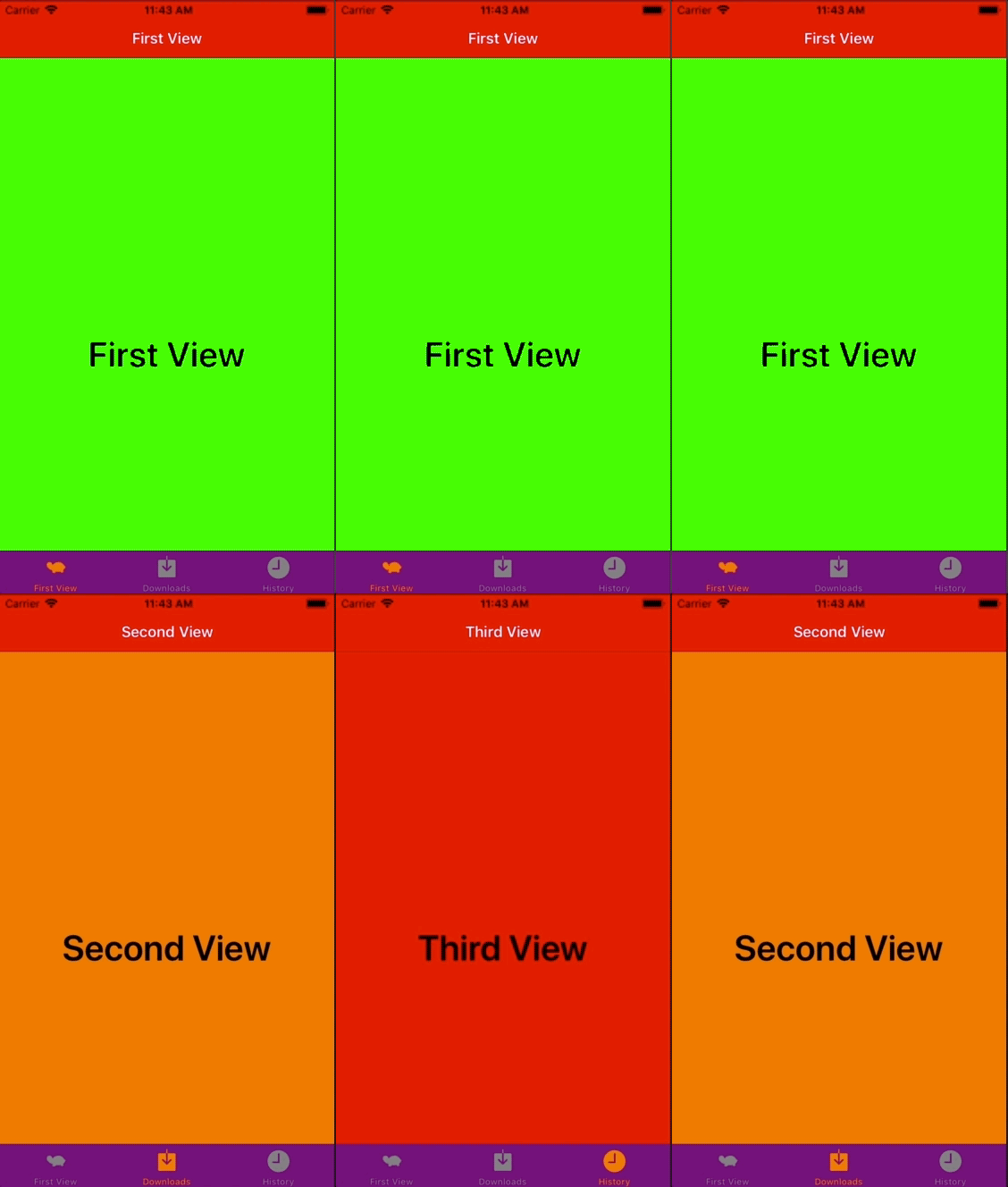
AppDelegate.swift
import UIKit

@UIApplicationMain
class AppDelegate: UIResponder, UIApplicationDelegate {

    var window: UIWindow?
    var tabBarController: UITabBarController?

    func application(_ application: UIApplication, didFinishLaunchingWithOptions launchOptions: [UIApplicationLaunchOptionsKey: Any]?) -> Bool {

        //ナビゲーションバー
        UINavigationBar.appearance().tintColor = UIColor.white
        UINavigationBar.appearance().barTintColor = UIColor.red
        UINavigationBar.appearance().isTranslucent = false
        UINavigationBar.appearance().titleTextAttributes = [NSAttributedStringKey.foregroundColor : UIColor.white]

        //タブバーコントローラー
        UITabBar.appearance().tintColor = UIColor.orange
        UITabBar.appearance().unselectedItemTintColor = UIColor.gray
        UITabBar.appearance().barTintColor = .purple
        UITabBar.appearance().isTranslucent = false

        // ページを格納する配列
        var viewControllers: [UIViewController] = []

        let firstViewController: FirstViewController? = FirstViewController()
        firstViewController?.tabBarItem = UITabBarItem(title: "First", image: UIImage(named: "tab-icon-sample"), tag: 1)
        let firstNavigationController = UINavigationController(rootViewController: firstViewController!)
        viewControllers.append(firstNavigationController)

        let secondViewController: SecondViewController? = SecondViewController()
        secondViewController?.tabBarItem = UITabBarItem(tabBarSystemItem: UITabBarSystemItem.downloads, tag: 2)
        let secondNavigationController = UINavigationController(rootViewController: secondViewController!)
        viewControllers.append(secondNavigationController)

        let thirdViewController: ThirdViewController? = ThirdViewController()
        thirdViewController?.tabBarItem = UITabBarItem(tabBarSystemItem: UITabBarSystemItem.history, tag: 3)
        let thirdNavigationController = UINavigationController(rootViewController: thirdViewController!)
        viewControllers.append(thirdNavigationController)

        tabBarController = UITabBarController()
        tabBarController?.setViewControllers(viewControllers, animated: false)

        self.window = UIWindow(frame: UIScreen.main.bounds)
        self.window!.makeKeyAndVisible()
        window?.rootViewController = tabBarController

        return true
    }

    func applicationWillResignActive(_ application: UIApplication) {
        // Sent when the application is about to move from active to inactive state. This can occur for certain types of temporary interruptions (such as an incoming phone call or SMS message) or when the user quits the application and it begins the transition to the background state.
        // Use this method to pause ongoing tasks, disable timers, and invalidate graphics rendering callbacks. Games should use this method to pause the game.
    }

    func applicationDidEnterBackground(_ application: UIApplication) {
        // Use this method to release shared resources, save user data, invalidate timers, and store enough application state information to restore your application to its current state in case it is terminated later.
        // If your application supports background execution, this method is called instead of applicationWillTerminate: when the user quits.
    }

    func applicationWillEnterForeground(_ application: UIApplication) {
        // Called as part of the transition from the background to the active state; here you can undo many of the changes made on entering the background.
    }

    func applicationDidBecomeActive(_ application: UIApplication) {
        // Restart any tasks that were paused (or not yet started) while the application was inactive. If the application was previously in the background, optionally refresh the user interface.
    }

    func applicationWillTerminate(_ application: UIApplication) {
        // Called when the application is about to terminate. Save data if appropriate. See also applicationDidEnterBackground:.
    }


}
FirstViewController.swift
import UIKit

class FirstViewController: UIViewController {

    override func viewDidLoad() {
        super.viewDidLoad()

        self.title = "First View"
        self.view.backgroundColor = .green

        let firstViewLabel = UILabel()
        firstViewLabel.frame = self.view.frame
        firstViewLabel.textAlignment = .center
        firstViewLabel.font = UIFont.boldSystemFont(ofSize: 40)
        firstViewLabel.textColor = .black
        firstViewLabel.text = "First View"
        self.view.addSubview(firstViewLabel)
    }
}
SecondViewController.swift
import UIKit

class SecondViewController: UIViewController {

    override func viewDidLoad() {
        super.viewDidLoad()

        self.title = "Second View"
        self.view.backgroundColor = .orange

        let firstViewLabel = UILabel()
        firstViewLabel.frame = self.view.frame
        firstViewLabel.textAlignment = .center
        firstViewLabel.font = UIFont.boldSystemFont(ofSize: 40)
        firstViewLabel.textColor = .black
        firstViewLabel.text = "Second View"
        self.view.addSubview(firstViewLabel)
    }
}
ThirdViewController.swift
import UIKit

class ThirdViewController: UIViewController {

    override func viewDidLoad() {
        super.viewDidLoad()

        self.title = "Third View"
        self.view.backgroundColor = .red

        let firstViewLabel = UILabel()
        firstViewLabel.frame = self.view.frame
        firstViewLabel.textAlignment = .center
        firstViewLabel.font = UIFont.boldSystemFont(ofSize: 40)
        firstViewLabel.textColor = .black
        firstViewLabel.text = "Third View"
        self.view.addSubview(firstViewLabel)

    }
}