
SwiftでMKMapViewに図を追加する
SwiftでMKMapViewに図を追加する方法です。 以下の例では大阪、松本、東京を結ぶ三角形を追加しています。
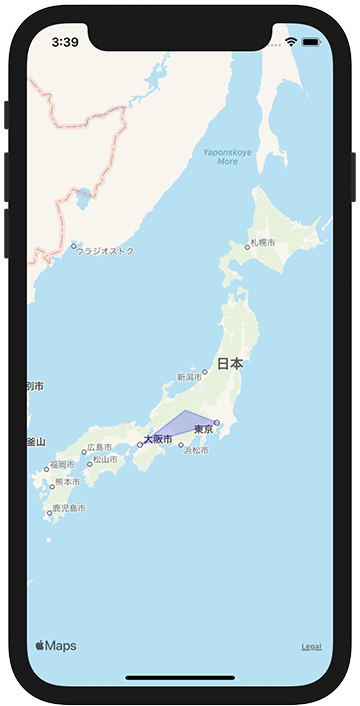
ViewController.swift
import UIKit
import MapKit

class ViewController: UIViewController {

    override func viewDidLoad() {
        super.viewDidLoad()

        let mapView = MKMapView()
        mapView.frame = view.bounds
        mapView.delegate = self
        view.addSubview(mapView)

        let coordinates: [CLLocationCoordinate2D]  = [
            CLLocationCoordinate2D(latitude: 35.6804, longitude: 139.7690),
            CLLocationCoordinate2D(latitude: 36.2380, longitude: 137.9720),
            CLLocationCoordinate2D(latitude: 34.6937, longitude: 135.5023),
        ]

        let polygon = MKPolygon(coordinates: coordinates, count: coordinates.count)
        mapView.addOverlay(polygon)
    }
}

extension ViewController: MKMapViewDelegate {
    func mapView(_ mapView: MKMapView, rendererFor overlay: MKOverlay) -> MKOverlayRenderer {
        if let polygone = overlay as? MKPolygon {
            let polylineRenderer = MKPolygonRenderer(polygon: polygone)
            polylineRenderer.strokeColor = .blue
            polylineRenderer.lineWidth = 2.0
            polylineRenderer.fillColor = .blue
            polylineRenderer.alpha = 0.2
            return polylineRenderer
        }
        return MKOverlayRenderer()
    }
}