
SwiftUIのListの中にボタンを複数設置する
SwiftUIのListの中にボタンを複数設置する方法です。
buttonStyle(PlainButtonStyle()) を設定することできました。
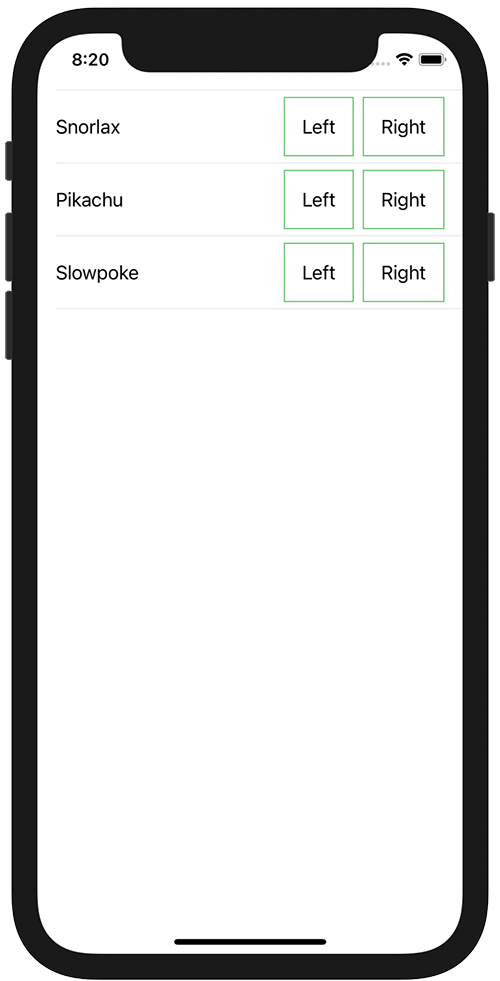
参考サイト SwiftUI pick a value from a list with ontap gesture
ContentView.swift
import SwiftUI

struct ContentView: View {
    let pokemons: [String] = ["Snorlax", "Pikachu", "Slowpoke"]
    var body: some View {
        List(pokemons, id: \.self) {pokemon in
            HStack(alignment: .center) {
                Text(pokemon)

                Spacer()

                Button {
                    print("\(pokemon) Left")
                } label: {
                    Text("Left")
                        .padding()
                        .border(Color.green)
                }
                .buttonStyle(PlainButtonStyle())

                Button {
                    print("\(pokemon) Right")
                } label: {
                    Text("Right")
                        .padding()
                        .border(Color.green)
                }
                .buttonStyle(PlainButtonStyle())
            }
            .contentShape(Rectangle())
            .onTapGesture {
                print("\(pokemon) Cell")
            }
        }
    }
}

struct ContentView_Previews: PreviewProvider {
    static var previews: some View {
        ContentView()
    }
}