
Jetpack ComposeのNavigationBarで画面を切り替える
Material 3のNavigationBarとNavigation Composeを組み合わせ、3つの画面を切り替えます。
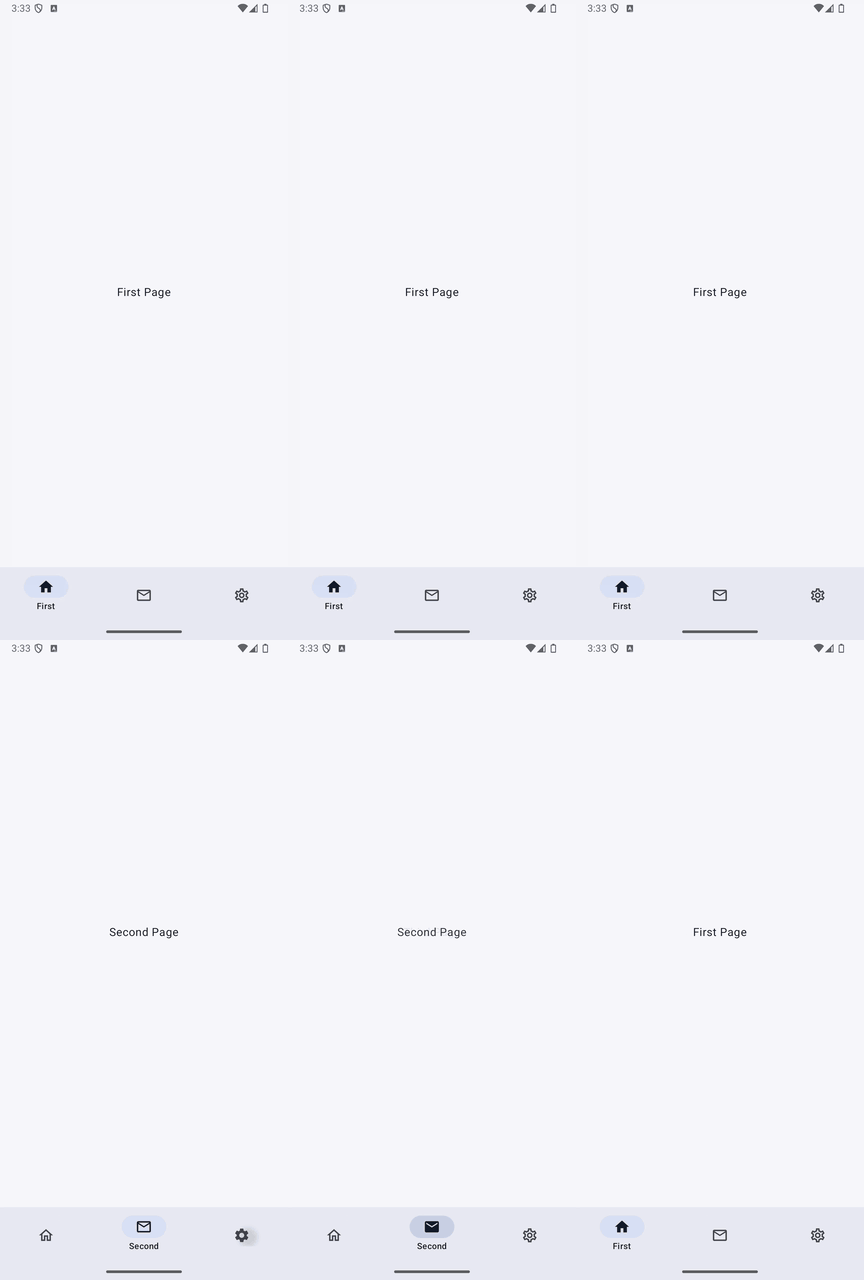
実装のポイント
NavigationBarItemの選択状態はcurrentBackStackEntryAsState()から求めます。選択番号を別の状態で持つ場合と違い、戻る操作でも表示中の画面とタブの選択が揃います。
launchSingleTopで同じ画面の連続追加を避け、popUpToとsaveState・restoreStateでトップレベルの画面を切り替えます。バックスタックの保存と復元も参照してください。
既存の画面遷移の記事は2画面間の基本的な遷移の例です。この記事では画面下部のナビゲーションバーを扱います。
準備
Android StudioのCompose対応プロジェクトで、Material 3を使用します。以下のコードではパッケージ名をcom.swiswiswift.swiswikotlinにしています。自分のプロジェクトに合わせて変更してください。テーマはMaterialThemeに揃えています。
各記事は独立したサンプルです。同じプロジェクトで試す場合は、前のサンプルのMainActivityやContentViewを置き換えてください。
Navigation Composeを使います。元プロジェクトの依存関係は次のとおりです(2.xのサンプルです)。
implementation("androidx.navigation:navigation-compose:2.7.7")
アイコンを使うため、Compose BOMを適用した依存関係にandroidx.compose.material:material-icons-extendedも追加します。
コード
MainActivity.kt
package com.swiswiswift.swiswikotlin

import android.os.Bundle
import androidx.activity.ComponentActivity
import androidx.activity.compose.setContent
import androidx.activity.enableEdgeToEdge
import androidx.compose.foundation.layout.Arrangement
import androidx.compose.foundation.layout.Column
import androidx.compose.foundation.layout.fillMaxSize
import androidx.compose.foundation.layout.padding
import androidx.compose.material.icons.Icons
import androidx.compose.material.icons.filled.Email
import androidx.compose.material.icons.filled.Home
import androidx.compose.material.icons.filled.Settings
import androidx.compose.material.icons.outlined.Email
import androidx.compose.material.icons.outlined.Home
import androidx.compose.material.icons.outlined.Settings
import androidx.compose.material3.Icon
import androidx.compose.material3.NavigationBar
import androidx.compose.material3.NavigationBarItem
import androidx.compose.material3.Scaffold
import androidx.compose.material3.Text
import androidx.compose.ui.Alignment
import androidx.compose.ui.Modifier
import androidx.navigation.NavGraph.Companion.findStartDestination
import androidx.navigation.compose.currentBackStackEntryAsState
import androidx.navigation.compose.NavHost
import androidx.navigation.compose.composable
import androidx.navigation.compose.rememberNavController
import androidx.compose.material3.MaterialTheme


class MainActivity : ComponentActivity() {
    override fun onCreate(savedInstanceState: Bundle?) {
        super.onCreate(savedInstanceState)
        enableEdgeToEdge()
        setContent {
            MaterialTheme {
                val navController = rememberNavController()
                val bottomNavigationItems = listOf(
                    BottomNavigationItem(
                        id = Route.FIRST,
                        title = "First",
                        selectedIcon = Icons.Filled.Home,
                        unselectedIcon = Icons.Outlined.Home,
                    ),
                    BottomNavigationItem(
                        id = Route.SECOND,
                        title = "Second",
                        selectedIcon = Icons.Filled.Email,
                        unselectedIcon = Icons.Outlined.Email,
                    ),
                    BottomNavigationItem(
                        id = Route.THIRD,
                        title = "Third",
                        selectedIcon = Icons.Filled.Settings,
                        unselectedIcon = Icons.Outlined.Settings,
                    ),
                )

                val currentRoute = navController.currentBackStackEntryAsState()
                    .value?.destination?.route

                Scaffold(
                    bottomBar = {
                        NavigationBar {
                            bottomNavigationItems.forEach { item ->
                                NavigationBarItem(
                                    selected = currentRoute == item.id.name,
                                    onClick = {
                                        navController.navigate(item.id.name) {
                                            popUpTo(navController.graph.findStartDestination().id) {
                                                saveState = true
                                            }
                                            launchSingleTop = true
                                            restoreState = true
                                        }
                                    },
                                    label = {
                                        Text(text = item.title)
                                    },
                                    alwaysShowLabel = false,
                                    icon = {
                                        Icon(
                                            imageVector = if (currentRoute == item.id.name) {
                                                item.selectedIcon
                                            } else {
                                                item.unselectedIcon
                                            },
                                            contentDescription = item.title
                                        )
                                    }
                                )
                            }
                        }
                    },
                    modifier = Modifier.fillMaxSize()
                ) { innerPadding ->
                    NavHost(
                        navController = navController,
                        startDestination = Route.FIRST.name
                    ) {
                        composable(Route.FIRST.name) {
                            Column(
                                modifier = Modifier
                                    .fillMaxSize()
                                    .padding(innerPadding),
                                horizontalAlignment = Alignment.CenterHorizontally,
                                verticalArrangement = Arrangement.Center
                            ) {
                                Text(text = "First Page")
                            }
                        }
                        composable(Route.SECOND.name) {
                            Column(
                                modifier = Modifier
                                    .fillMaxSize()
                                    .padding(innerPadding),
                                horizontalAlignment = Alignment.CenterHorizontally,
                                verticalArrangement = Arrangement.Center
                            ) {
                                Text(text = "Second Page")
                            }
                        }
                        composable(Route.THIRD.name) {
                            Column(
                                modifier = Modifier
                                    .fillMaxSize()
                                    .padding(innerPadding),
                                horizontalAlignment = Alignment.CenterHorizontally,
                                verticalArrangement = Arrangement.Center
                            ) {
                                Text(text = "Third Page")
                            }
                        }
                    }
                }
            }
        }
    }
}
Route.kt
package com.swiswiswift.swiswikotlin

enum class Route { FIRST, SECOND, THIRD }
BottomNavigationItem.kt
BottomNavigationItem.ktをダウンロード
package com.swiswiswift.swiswikotlin

import androidx.compose.ui.graphics.vector.ImageVector

data class BottomNavigationItem(
    val id: Route,
    val title: String,
    val selectedIcon: ImageVector,
    val unselectedIcon: ImageVector,
)