
Jetpack Composeでリストの項目を開いて自動スクロールする
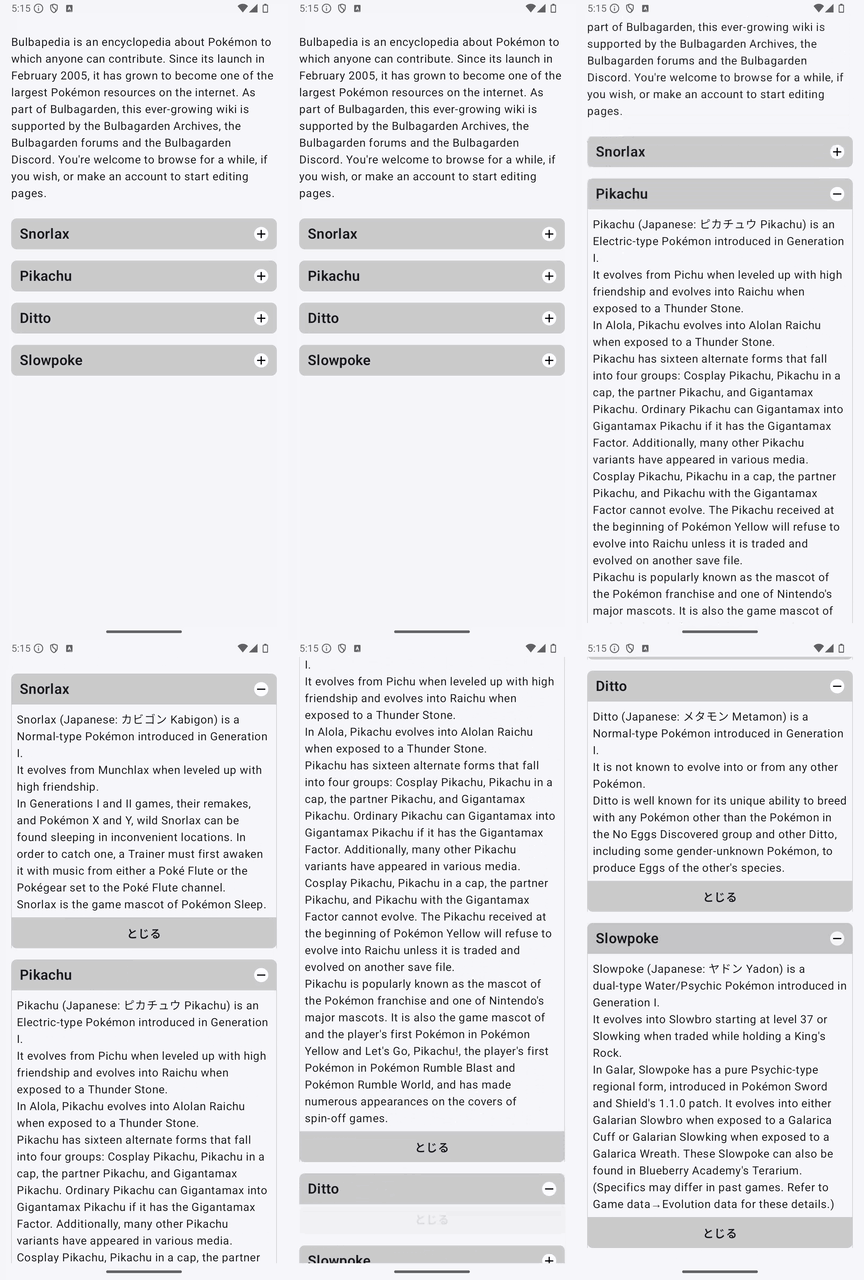
LazyColumnの項目を展開し、開いた項目へアニメーション付きでスクロールします。
実装のポイント
openIndexで開いている項目を保持し、AnimatedVisibilityで本文を表示します。開くとLaunchedEffect(openIndex)が実行され、animateScrollToItemでその項目へスクロールします。この関数はコルーチンから呼び出します。リストのスクロール制御も参照してください。
保存されていた録画では複数の項目を同時に開けますが、下のコードは仕組みが追いやすいよう、1項目ずつ開く例に整理しています。説明文と見た目も簡略化しています。元のコードで使われていたPokemonCardも掲載しました。
delay(300)は元の例に合わせた待ち時間です。展開の完了を検出する処理ではないので、アニメーションや内容を変更したら調整が必要です。最後の項目など、下側の余白が足りない場合は、スクロールしても項目が画面の一番上に届かないことがあります。
準備
Android StudioのCompose対応プロジェクトで、Material 3を使用します。以下のコードではパッケージ名をcom.swiswiswift.swiswikotlinにしています。自分のプロジェクトに合わせて変更してください。テーマはMaterialThemeに揃えています。
各記事は独立したサンプルです。同じプロジェクトで試す場合は、前のサンプルのMainActivityやContentViewを置き換えてください。
コード
MainActivity.kt
package com.swiswiswift.swiswikotlin

import android.os.Bundle
import androidx.activity.ComponentActivity
import androidx.activity.compose.setContent
import androidx.activity.enableEdgeToEdge
import androidx.compose.foundation.layout.fillMaxSize
import androidx.compose.foundation.layout.padding
import androidx.compose.material3.MaterialTheme
import androidx.compose.material3.Scaffold
import androidx.compose.ui.Modifier

class MainActivity : ComponentActivity() {
    override fun onCreate(savedInstanceState: Bundle?) {
        super.onCreate(savedInstanceState)
        enableEdgeToEdge()
        setContent {
            MaterialTheme {
                Scaffold(modifier = Modifier.fillMaxSize()) { innerPadding ->
                    ContentView(modifier = Modifier.padding(innerPadding))
                }
            }
        }
    }
}
ContentView.kt
package com.swiswiswift.swiswikotlin

import androidx.compose.foundation.layout.PaddingValues
import androidx.compose.foundation.lazy.LazyColumn
import androidx.compose.foundation.lazy.itemsIndexed
import androidx.compose.foundation.lazy.rememberLazyListState
import androidx.compose.runtime.Composable
import androidx.compose.runtime.LaunchedEffect
import androidx.compose.runtime.getValue
import androidx.compose.runtime.mutableStateOf
import androidx.compose.runtime.saveable.rememberSaveable
import androidx.compose.runtime.setValue
import androidx.compose.ui.Modifier
import androidx.compose.ui.unit.dp
import kotlinx.coroutines.delay

@Composable
fun ContentView(modifier: Modifier = Modifier) {
    val listState = rememberLazyListState()
    var openIndex by rememberSaveable { mutableStateOf<Int?>(null) }
    val names = listOf("Snorlax", "Pikachu", "Ditto", "Slowpoke")
    val descriptions = listOf(
        "This is Snorlax.\n".repeat(12),
        "This is Pikachu.\n".repeat(12),
        "This is Ditto.\n".repeat(12),
        "This is Slowpoke.\n".repeat(12)
    )

    LaunchedEffect(openIndex) {
        val index = openIndex ?: return@LaunchedEffect
        delay(300)
        listState.animateScrollToItem(index)
    }

    LazyColumn(
        modifier = modifier,
        state = listState,
        contentPadding = PaddingValues(16.dp)
    ) {
        itemsIndexed(names, key = { _, name -> name }) { index, name ->
            PokemonCard(
                open = openIndex == index,
                title = name,
                description = descriptions[index],
                tap = { openIndex = if (openIndex == index) null else index }
            )
        }
    }
}
PokemonCard.kt
package com.swiswiswift.swiswikotlin

import androidx.compose.animation.AnimatedVisibility
import androidx.compose.foundation.background
import androidx.compose.foundation.clickable
import androidx.compose.foundation.layout.Arrangement
import androidx.compose.foundation.layout.Column
import androidx.compose.foundation.layout.Row
import androidx.compose.foundation.layout.Spacer
import androidx.compose.foundation.layout.fillMaxWidth
import androidx.compose.foundation.layout.padding
import androidx.compose.material3.Text
import androidx.compose.runtime.Composable
import androidx.compose.ui.Alignment
import androidx.compose.ui.Modifier
import androidx.compose.ui.graphics.Color
import androidx.compose.ui.text.font.FontWeight
import androidx.compose.ui.unit.dp

@Composable
fun PokemonCard(
    open: Boolean,
    title: String,
    description: String,
    tap: () -> Unit
) {
    Column(modifier = Modifier.fillMaxWidth().padding(bottom = 16.dp)) {
        Row(
            modifier = Modifier
                .fillMaxWidth()
                .background(Color.LightGray)
                .clickable(onClick = tap)
                .padding(12.dp),
            verticalAlignment = Alignment.CenterVertically
        ) {
            Text(text = title, fontWeight = FontWeight.SemiBold)
            Spacer(modifier = Modifier.weight(1f))
            Text(text = if (open) "−" else "+")
        }
        AnimatedVisibility(visible = open) {
            Column {
                Text(text = description, modifier = Modifier.padding(12.dp))
                Row(
                    modifier = Modifier
                        .fillMaxWidth()
                        .background(Color.LightGray)
                        .clickable(onClick = tap)
                        .padding(12.dp),
                    horizontalArrangement = Arrangement.Center
                ) {
                    Text(text = "とじる")
                }
            }
        }
    }
}