
Jetpack ComposeでボタンごとにAlertDialogを出し分ける
2つのボタンから異なる内容のダイアログを開きます。
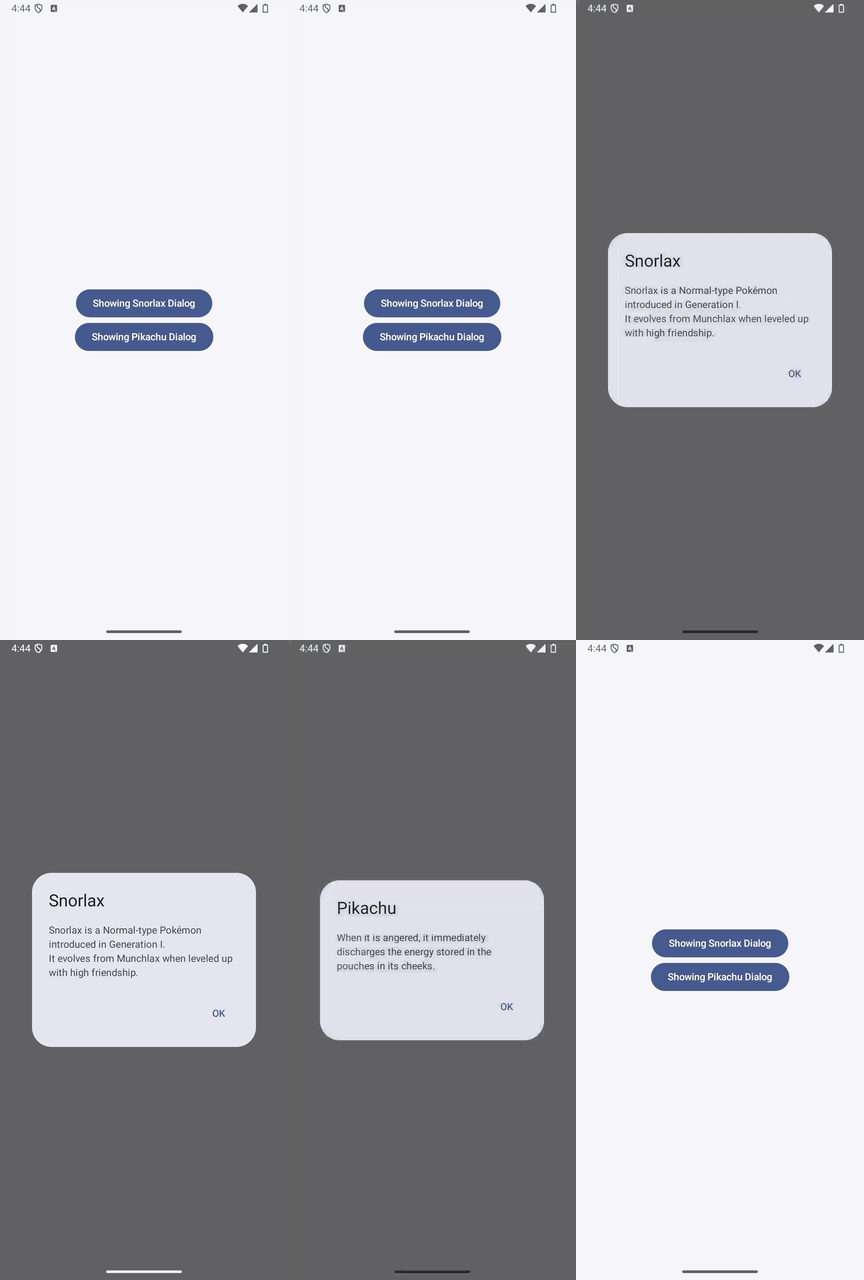
実装のポイント
ボタンごとに表示状態を持ち、対応するAlertDialogの内容を切り替えます。この例では、それぞれのOKボタンで該当する状態をfalseに戻しています。
ダイアログの種類が増える場合や必ず1つだけ表示したい場合は、2つのBooleanの代わりに、表示中の種類を表すenumなどを1つの状態として持つと管理しやすくなります。外側のタップで閉じない動作は基本のダイアログと同じです。
準備
Android StudioのCompose対応プロジェクトで、Material 3を使用します。以下のコードではパッケージ名をcom.swiswiswift.swiswikotlinにしています。自分のプロジェクトに合わせて変更してください。テーマはMaterialThemeに揃えています。
各記事は独立したサンプルです。同じプロジェクトで試す場合は、前のサンプルのMainActivityやContentViewを置き換えてください。
コード
MainActivity.kt
package com.swiswiswift.swiswikotlin

import android.os.Bundle
import androidx.activity.ComponentActivity
import androidx.activity.compose.setContent
import androidx.activity.enableEdgeToEdge
import androidx.compose.foundation.layout.fillMaxSize
import androidx.compose.foundation.layout.padding
import androidx.compose.material3.MaterialTheme
import androidx.compose.material3.Scaffold
import androidx.compose.ui.Modifier

class MainActivity : ComponentActivity() {
    override fun onCreate(savedInstanceState: Bundle?) {
        super.onCreate(savedInstanceState)
        enableEdgeToEdge()
        setContent {
            MaterialTheme {
                Scaffold(modifier = Modifier.fillMaxSize()) { innerPadding ->
                    ContentView(modifier = Modifier.padding(innerPadding))
                }
            }
        }
    }
}
ContentView.kt
package com.swiswiswift.swiswikotlin

import androidx.compose.foundation.layout.Arrangement
import androidx.compose.foundation.layout.Column
import androidx.compose.foundation.layout.fillMaxSize
import androidx.compose.material3.AlertDialog
import androidx.compose.material3.Button
import androidx.compose.material3.Text
import androidx.compose.material3.TextButton
import androidx.compose.runtime.Composable
import androidx.compose.runtime.mutableStateOf
import androidx.compose.runtime.remember
import androidx.compose.ui.Alignment
import androidx.compose.ui.Modifier
import androidx.compose.ui.tooling.preview.Preview
import androidx.compose.material3.MaterialTheme

@Composable
fun ContentView(modifier: Modifier = Modifier) {
    val openSnorlaxDialog = remember { mutableStateOf(false) }
    val openPikachuDialog = remember { mutableStateOf(false) }

    // Snorlax Dialog
    if (openSnorlaxDialog.value) {
        AlertDialog(
            onDismissRequest = {},
            title = {
                Text(text = "Snorlax")
            },
            text = {
                Text("Snorlax is a Normal-type Pokémon introduced in Generation I.\nIt evolves from Munchlax when leveled up with high friendship.")
            },
            confirmButton = {
                TextButton(
                    onClick = {
                        openSnorlaxDialog.value = false
                    }
                ) {
                    Text("OK")
                }
            },
            dismissButton = null
        )
    }

    // Pikachu Dialog
    if (openPikachuDialog.value) {
        AlertDialog(
            onDismissRequest = {},
            title = {
                Text(text = "Pikachu")
            },
            text = {
                Text("When it is angered, it immediately discharges the energy stored in the pouches in its cheeks.")
            },
            confirmButton = {
                TextButton(
                    onClick = {
                        openPikachuDialog.value = false
                    }
                ) {
                    Text("OK")
                }
            },
            dismissButton = null
        )
    }

    Column(
        modifier = modifier
            .fillMaxSize(),
        horizontalAlignment = Alignment.CenterHorizontally,
        verticalArrangement = Arrangement.Center
    ) {
        Button(
            onClick = {
                openSnorlaxDialog.value = true
            }
        ) {
            Text("Showing Snorlax Dialog")
        }

        Button(
            onClick = {
                openPikachuDialog.value = true
            }
        ) {
            Text("Showing Pikachu Dialog")
        }
    }
}

@Preview(showBackground = true)
@Composable
fun ContentViewPreview() {
    MaterialTheme {
        ContentView()
    }
}