
UIButton
UIButtonクラスはボタンを設置するためのクラスです。
ボタンタップでアクションを起こすことができます。
UIButtonのクラス階層
NSObject
↑
UIResponder
↑
UIView
↑
UIControl
↑
UIButton
AppleDeveloperリファレンスUIButton
UIButton例文
様々なUIButtonのサンプルです
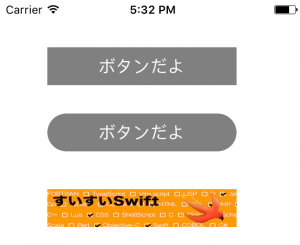
UIButtonBasic.swift
import UIKit

class ViewController: UIViewController {

    override func viewDidLoad() {
        super.viewDidLoad()

        //ボタンの生成
        let basicButton = UIButton()

        //ボタンの位置と大きさの指定
        //x:50,y:50の位置に横幅200:縦40のボタンを設置
        basicButton.frame = CGRect(x: 50, y: 50, width: 200, height: 40)

        //背景色の指定、灰色
        basicButton.backgroundColor = UIColor.gray

        //押された時のアクションを設定
        basicButton.addTarget(self, action: #selector(basicButtonClicked(sender:)), for:.touchUpInside)

        //ボタンのテキストを設定
        basicButton.setTitle("ボタンだよ", for: UIControlState.normal)
        basicButton.setTitle("押された時", for: UIControlState.highlighted)

        //テキストの色を指定
        basicButton.setTitleColor(UIColor.white, for: UIControlState.normal)

        //Viewに配置
        self.view.addSubview(basicButton)


        //角丸ボタン
        //ボタンの生成
        let cornerCircleButton = UIButton()

        //ボタンの位置と大きさの指定
        cornerCircleButton.frame = CGRect(x: 50, y: 120, width: 200, height: 40)

        //背景色の指定、灰色
        cornerCircleButton.backgroundColor = UIColor.gray

        //押された時のアクションを設定
        cornerCircleButton.addTarget(self, action: #selector(cornerCircleButtonClicked(sender:)), for:.touchUpInside)

        //ボタンのテキストを設定
        cornerCircleButton.setTitle("ボタンだよ", for: UIControlState.normal)
        cornerCircleButton.setTitle("押された時", for: UIControlState.highlighted)

        //テキストの色を指定
        cornerCircleButton.setTitleColor(UIColor.white, for: UIControlState.normal)

        //ボタンを角丸にします
        cornerCircleButton.layer.masksToBounds = true
        cornerCircleButton.layer.cornerRadius = 20.0

        //Viewに配置
        self.view.addSubview(cornerCircleButton)


        //画像ボタンの生成
        let imageButton = UIButton()

        //ボタンの位置と大きさの指定
        imageButton.frame = CGRect(x: 50, y: 200, width: 200, height: 40)

        //背景色の指定、灰色
        imageButton.backgroundColor = UIColor.gray

        //押された時のアクションを設定
        imageButton.addTarget(self, action: #selector(imageButtonClicked(sender:)), for:.touchUpInside)

        //ボタン背景を画像にしてみます
        let buttonImage:UIImage = UIImage(named: "buttonImage")!
        imageButton.setBackgroundImage(buttonImage, for: UIControlState.normal)

        //Viewに配置
        self.view.addSubview(imageButton);

    }

    //basicボタンが押されたら呼ばれます
    internal func basicButtonClicked(sender: UIButton){
        print("basicButtonBtnClicked")
    }

    //角丸ボタンが押されたら呼ばれます
    internal func cornerCircleButtonClicked(sender: UIButton){
        print("cornerCircleButtonBtnClicked")
    }

    //画像ボタンが押されたら呼ばれます
    internal func imageButtonClicked(sender: UIButton){
        print("imageButtonBtnClicked")
    }
}